
If you are looking for a LIMS (Laboratory Information Management System) and have come across SENAITE, you probably have questions. What exactly is it? Who is it for? Is it really free? Can it handle your workflows? This post covers everything you need to know.
SENAITE LIMS in a Nutshell
SENAITE LIMS is a free, open-source laboratory information management system. It manages the complete sample lifecycle in a laboratory — from the moment a sample is registered to the point where the final report is published and sent to the client.
SENAITE is not a side project or a proof of concept. It runs in production laboratories on every continent. Water utilities, mining companies, food producers, clinical labs, and research institutions use it daily to manage thousands of samples.
The project is developed and maintained by RIDING BYTES, with contributions from the global SENAITE community.
What SENAITE Does
A LIMS replaces the paper trail in a laboratory. Instead of logbooks, spreadsheets, and emails, everything goes through one system. SENAITE covers the core workflow that most laboratories share:
Sample Registration
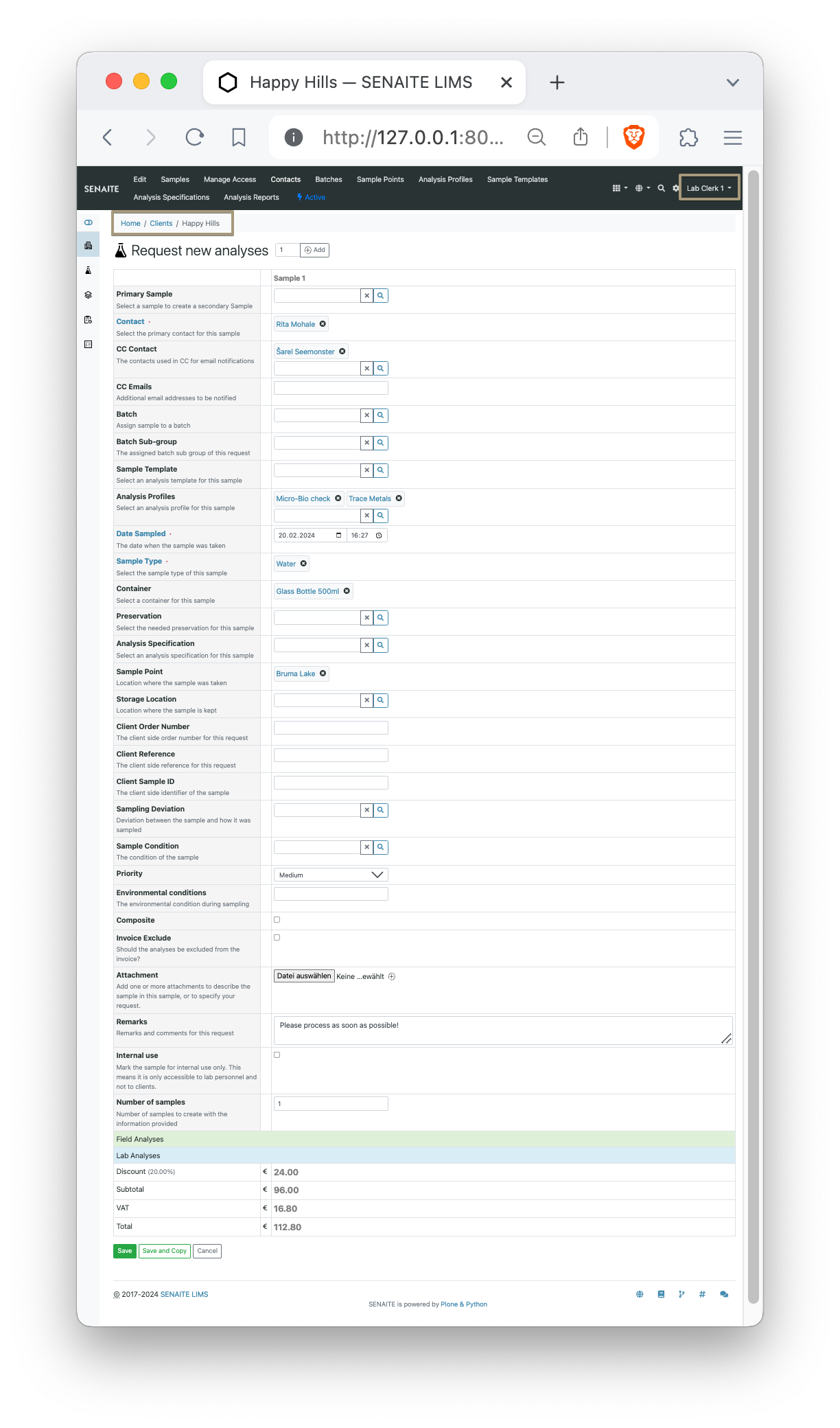
Samples are registered with all relevant metadata: client, sample type, date sampled, priority, and which analyses to perform. SENAITE supports configurable sample types, so whether you are testing drinking water, ore concentrate, or blood samples, the registration form adapts to your needs.
Analysis and Result Entry
Lab technicians enter results either manually or through automatic instrument import. SENAITE supports worksheets that group analyses for efficient batch processing, including reference samples, duplicates, and blanks for quality control.
Verification and Review
Results go through one or more verification steps before they are published. This multi-level review ensures data integrity and is essential for accredited laboratories. The entire chain — who entered what, who verified it, when — is recorded in a full audit trail.
Calculations
SENAITE supports calculated results: formulas that derive values from measured inputs. You define the formula once, and SENAITE computes the result automatically whenever the input values are entered. Supports interim fields, dependent analyses, and custom Python expressions.
Instrument Integration
Manual data entry is slow and error-prone. SENAITE can import results directly from laboratory instruments via serial interfaces, file-based import (CSV, XML, proprietary formats), or API-based connections. This saves time and eliminates transcription errors.
Reporting
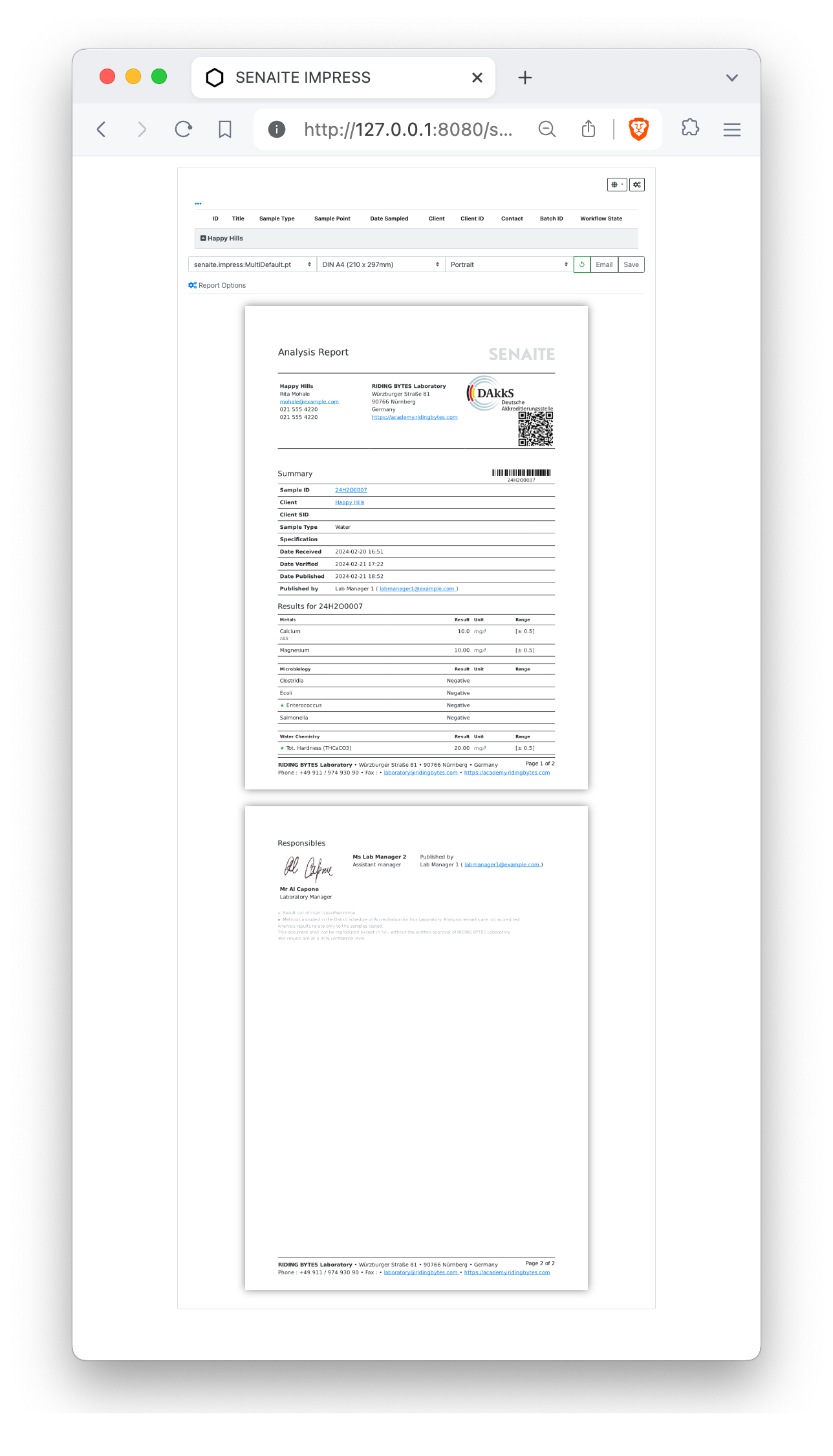
Once results are verified and published, SENAITE generates analysis reports (certificates of analysis) as PDF. Report templates are fully customizable — you can match your company branding and include exactly the information your clients need.
Client Portal
Your clients can log in to SENAITE and see their own samples and reports. They can track progress, download published reports, and submit new sample requests — without calling the lab.
Who Uses SENAITE
SENAITE is industry-agnostic. The sample workflow — register, analyze, verify, report — is fundamentally the same whether you test water, soil, food, or clinical specimens. Here are the most common sectors:
- Water and Environmental — municipal water treatment, environmental monitoring, wastewater analysis
- Mining and Metals — exploration, processing, assay labs
- Food and Beverage — quality assurance, safety testing, regulatory compliance
- Clinical and Veterinary — hospital labs, diagnostics, veterinary testing
- Agriculture — soil analysis, fertilizer testing, crop science
- Industrial QC — manufacturing quality control, materials testing
Laboratories range from small single-site operations to multi-location enterprises with dozens of users.
Why Open Source?
Most commercial LIMS products charge annual license fees per user or per module. Over the lifetime of a LIMS deployment (typically 10+ years), these costs add up to significant amounts. And if you want to switch vendors, your data is often locked in a proprietary format.
SENAITE takes a different approach:
- No license fees — download and use it for free, forever. The software is released under the GPLv2 open-source license.
- Full source code access — every line of code is on GitHub. No black boxes, no hidden functionality.
- No vendor lock-in — your data is stored in an open format. You can export it, back it up, or migrate it at any time.
- Community-driven — bug reports, feature requests, and contributions come from laboratories worldwide. The software improves because real users push it forward.
You pay for services when you need them — setup, customization, training, support — not for the right to use the software.
Technology Stack
SENAITE is built on Python, one of the most widely used programming languages in science and data analysis. The web framework is Plone/Zope, an enterprise content management platform with built-in security, role-based access control, and a powerful workflow engine.
Deployment options:
- Docker — the fastest way to get started. Pull the image and run:
docker pull senaite/senaite:2.x
docker run --rm -p 8080:8080 senaite/senaite:2.x
Open http://localhost:8080 and you have a running SENAITE instance. See our 5-minute Docker guide for a full walkthrough.
- Bare metal / VM — install on Ubuntu or Debian with Buildout, a declarative configuration system for reproducible deployments. See our Ubuntu 24.04 installation guide.
- Cloud — runs on any Linux server (AWS, Azure, Hetzner, etc.). We also offer managed hosting with SLAs.
SENAITY — The Dashboard Add-On
One thing SENAITE does not have out of the box is a real-time monitoring dashboard. That is why we built SENAITY — a Kanban-style dashboard that connects to your SENAITE instance and shows your entire sample pipeline at a glance.
SENAITY adds search, sample comparison, anomaly detection with machine learning, and XLSX export. It works on desktop, tablet, and mobile. Try it for free.
Getting Help
As the Core Developers of SENAITE, we at RIDING BYTES offer the full range of professional services:
- Consulting and project management
- Custom development and integrations
- Workshops and training
- IT services and managed hosting
You can also join the SENAITE Community Forum to ask questions, share experiences, and connect with other users.
Contact us if you want to discuss whether SENAITE is the right fit for your laboratory.

Ramon
Related Posts
We built SENAITY because we needed it ourselves. After years of working with laboratories running SENAITE LIMS, we kept seeing the same pattern: lab managers opening multiple browser tabs, clicking through sample listings, trying to piece together where things stand. Which samples are overdue? What is stuck in verification? Did [...]
Choosing a LIMS is a long-term decision. Most laboratories run their LIMS for 10 to 15 years before replacing it. That makes the initial choice important — not just in terms of features, but in terms of cost, flexibility, and control. This post compares SENAITE LIMS (open source) with typical [...]
