
A LIMS tracks every sample from registration to the published report. It holds the workflow your analysts follow, records who entered, changed and approved each result, and produces the documents your customers and auditors read. Labs tend to keep a LIMS for many years, so the choice outlasts most of the people who make it.
SENAITE is a free, open-source LIMS released under the GNU GPL version 2. We are among its core developers and maintainers. This guide describes what it does, where its limits are, and how a lab usually gets from evaluation to a running system.
Everything revolves around the sample
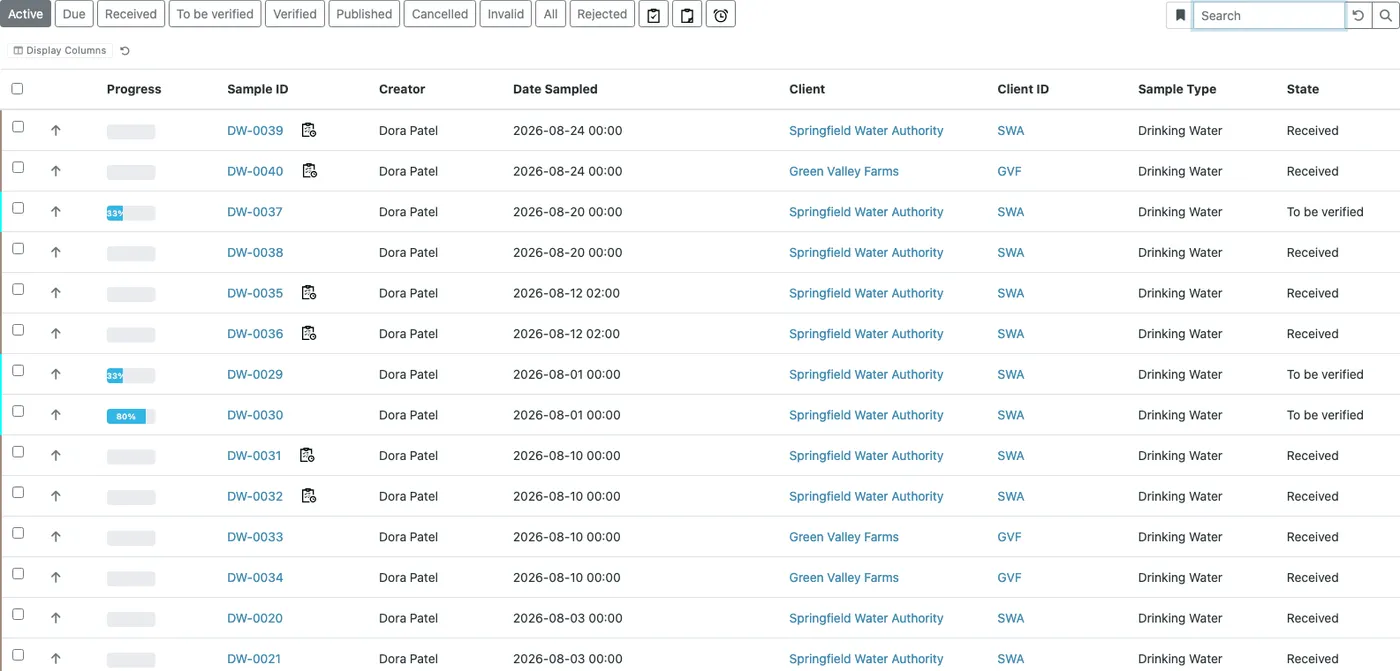
A sample in SENAITE is registered, received, tested, verified and finally published. Each step is a workflow transition, and each transition is allowed only to the roles your lab assigns to it. A lab clerk receives, an analyst submits results, a verifier checks them, a lab manager publishes. The system enforces that order, so a result cannot reach a report without passing every step.
Around that core sit the pieces most labs need:
- Setup. Sample types, sample points, containers, methods, instruments, analysis services with their units and keywords, and analysis profiles that bundle services into panels.
- Results. Manual entry, entry for many samples on one grid, or import from instrument files. Calculations derive results from other results or from interim values such as weights and volumes. Formulas are Python expressions, so most of what a spreadsheet formula can express, a calculation can too.
- Quality rules. Specifications with valid and warning ranges, result options for qualitative tests, uncertainties, detection limits, and up to four required verifications per analysis service.
- Worksheets. Analyses grouped for one analyst or one instrument run, with blanks, controls and duplicates placed by a template.
- Reports. PDF results reports with your laboratory’s logo and accreditation details, published per sample or for several samples at once.
- Client access. Client contacts can get a login and see only their own organisation’s samples and reports.
- History. Every change to a sample, an analysis or a setup item is stored as a snapshot with user, time and the changed fields. A global audit log view across all objects can be switched on in the setup.
What it does not do out of the box
These questions come up in every evaluation, so here are the answers up front:
- No 21 CFR Part 11 electronic signatures. SENAITE records who did what and when, but it has no separate signing act with password re-entry and a stated meaning of the signature. Labs under Part 11 add that layer and validate the system. Our compliance post goes through it clause by clause.
- No validation package in a box. The audit trail, the role model and the workflow are the pieces a validation needs. The IQ, OQ and PQ documents belong to your lab and are written against your configuration.
- No built-in analytics. SENAITE is built to run the lab, not to report across millions of analyses. Monthly figures such as turnaround times come from an export or from a reporting database next to it, such as SENAITE Data Lens.
- No driver for every instrument. File imports cover many
common formats, and ASTM and HL7 instruments connect through
the
senaite.astmmiddleware. A device nobody has connected yet needs an importer written for it.
Is it really free
Yes. You can download, install, modify and run SENAITE without a licence fee and without per-user or per-sample charges. What costs money is the work around it: configuration, custom development, training, instrument integration, hosting and support. A lab with in-house Python developers can do much of that itself. Most labs cannot, and that is the work we do.
Why open source matters for a LIMS
Three properties count over a long horizon:
- You can read the code. Your IT can review what runs in your network, and you can answer an auditor’s question about how a value was computed by pointing at the line that computes it.
- You can change the code. A calculation specific to your method, an import for an unusual instrument, an extra field on the sample. None of it waits for a vendor roadmap.
- You keep your data. The data model is in the code, the JSON API reads every object, and nobody can withdraw your access to your own system.
What it runs on
SENAITE is written in Python and runs on the Zope application server with the ZODB object database. The current 2.x line runs on Python 2.7. Moving the platform to Python 3 is the largest open item on the project’s list. For the details and what they mean for operations, see SENAITE under the hood.
- Add-ons. Lab-specific behaviour lives in an add-on package next to the core, so SENAITE updates do not overwrite your customisations.
- JSON API. Reads and writes samples, analyses and setup data for integrations and scripts.
- Buildout. The installation is described in configuration files, so the same environment can be rebuilt on a new server.
- Docker. Public images for testing and development.
How to try it
The public Docker image gives you a test system in a few minutes:
docker run --rm -p 8080:8080 senaite/senaite:2.xOpen http://localhost:8080, log in with admin / admin and
add a SENAITE site. This is a test system, not a production
setup. For the full walk-through with a first sample, see
Run SENAITE in less than 5 minutes.
What a project with us looks like
Every project starts with a 3-day online workshop. Before it, we preconfigure a SENAITE for your requirements. During the three days your team sets up the lab with us in the order the system needs it: lab structure and contacts, sample types and analysis services, clients, then samples, results, verification and the report, and finally worksheets and instrument imports. There is no participant limit, so clerks, analysts, admins and developers can all attend.
You leave with a working system, your own add-on in a private GitHub repository, and access to our documentation portal. After that we offer custom development for what your lab needs beyond the standard, and SENAITE Care for monitoring, maintenance and support in production.
If SENAITE looks like a fit, tell us about your lab.