

When a result is challenged, by a client, an assessor or a court, the laboratory has to answer three questions quickly: who did what, when, and what was the value before it changed. A LIMS cannot make a laboratory compliant. It can take whole classes of risk out of the manual process, and it can make the answers to those three questions cheap to produce.
This post maps what SENAITE records to the two frameworks most of our clients ask about: ISO/IEC 17025:2017 for testing and calibration laboratories, and 21 CFR Part 11 for electronic records under FDA rules. It also names the settings to check before go-live and the gaps a laboratory has to close itself. Everything below refers to SENAITE 2.x as shipped, without add-ons, unless stated otherwise.
What SENAITE records
Two mechanisms work together. Knowing which is which saves time in an audit.
The review history is kept on every sample, analysis and worksheet. Each workflow step (receive, submit, verify, retract, publish, invalidate) adds an entry with the user, the server time, the step and an optional comment. The interface offers no way to edit or delete entries.
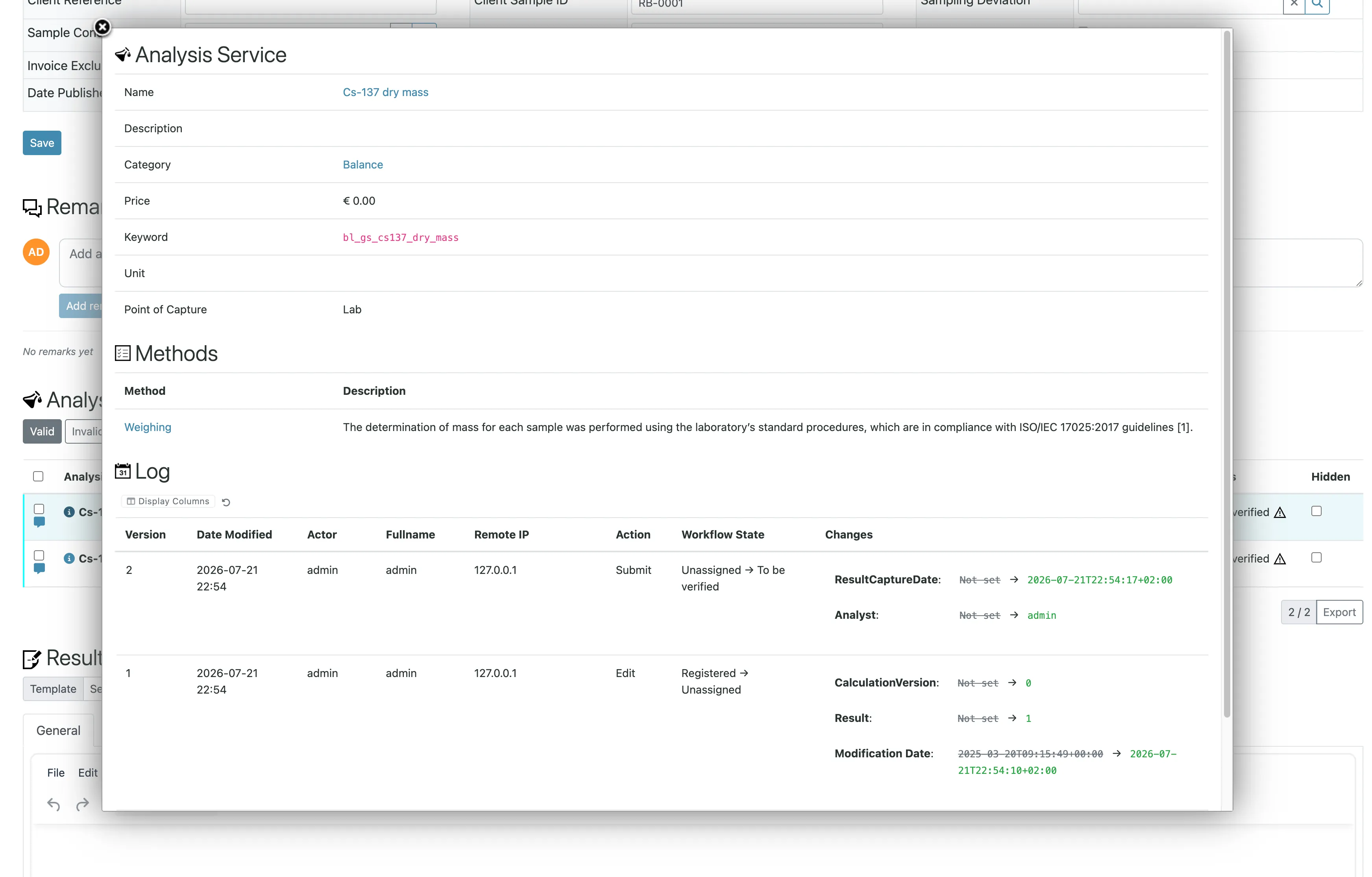
The audit log goes further. Each time an object is created,
edited or moves through a workflow step, SENAITE stores a
snapshot of all its fields together with the user, their roles,
the workflow state, the server time, the remote address and the
browser’s user agent. The Log view of an object shows these
versions as a table with a field-by-field diff: which value was
there before, which after, who changed it, from where. This
applies to samples and analyses, but also to setup objects such
as Analysis Services, so a changed detection limit or
specification is traceable as well.
ISO/IEC 17025:2017
Clause numbers refer to the 2017 edition. The wording of the standard is paraphrased here, not quoted.
7.5 Technical records
The standard asks that changes to technical records can be traced back to previous versions or to the original observation, including who changed what and when.
In SENAITE, a result becomes read-only once it is submitted. To change it, someone retracts it or orders a retest before verification, or a lab manager invalidates the published sample afterwards. In each case the original stays in place with its history, and the new value lives in a new analysis or a new sample that refers back to it. Nothing is overwritten.
Samples that are disposed or dispatched lock their analyses as well, so their results cannot be changed through the interface or the JSON API.
7.11 Control of data and information management
The standard asks that a laboratory information system is validated for its intended use before it goes live, and that changes to it, including configuration changes, are authorized, documented and validated before they are applied.
Two kinds of change are involved, and SENAITE helps differently with each.
Changes to the software are developed in the open. Every change to SENAITE goes through a pull request on GitHub with a description, a review and tests, and each release lists its changes. That gives your change control a reference to cite, but the decision to install a new release, and its validation in your environment, remain yours.
Changes to the configuration (services, methods, calculations, specifications, users) are recorded by the audit log described above. The log shows that a change happened and what it was. It does not ask for an approval before the change takes effect. If your procedures require approval of configuration changes, that approval happens outside SENAITE, for example in your change request process, and the audit log is the evidence that only approved changes were made.
Validation itself is work against your installation: your configuration, your workflows, your acceptance criteria. SENAITE gives you a pinned, reproducible installation, for example the Enterprise VM, and code you can reference by version. It does not ship IQ, OQ and PQ documents. We write those with the laboratory as part of a project.
6.2 Personnel and the separation of duties
The standard asks the laboratory to authorize personnel for specific activities and to keep records of it.
SENAITE maps activities to roles. The ones that matter most:
Analyst enters and submits results, Verifier verifies,
LabManager can additionally retract, order retests and
invalidate, Publisher publishes reports, LabClerk registers
and receives samples. The workflow checks the role at every step,
so an analyst cannot verify and a clerk cannot enter results.
The four-eyes principle on results depends on three settings, covered in detail in the post on verification: self-verification (off by default, keep it off), the number of required verifications, and whether the same user may contribute more than one verification. The last one allows it by default, which defeats a second verification level unless you change it.
SENAITE does not hold training or competence records. Which user has which role is visible in the user management, but the evidence that the person is competent for it lives in your quality system.
7.8 Reporting of results
Published reports are stored as PDF inside the sample they belong to, so the exact document a client received can be retrieved later, including earlier versions after a republication. The report engine renders detection limits, uncertainties and specifications according to the settings of each analysis.
The default templates list the department managers of the reported analyses as responsible persons, with a scanned signature image if one is stored on their lab contact, and name the user who published. These are images on a document, not electronic signatures in the sense of Part 11.
21 CFR Part 11
Part 11 sets the rules for electronic records and electronic signatures in FDA-regulated work. Laboratories outside that scope often use it as a reference for good practice. SENAITE provides a solid basis for the record requirements and does not provide Part 11 electronic signatures. A laboratory with Part 11 obligations should plan for both parts separately.
§11.10(c) Protection of records
“Protection of records to enable their accurate and ready retrieval throughout the records retention period.”
SENAITE keeps its data in one object database file with a separate directory for binary files such as PDFs and attachments. Keeping records for ten or twenty years is a question of backups and restore tests, not of database migrations. What matters is that the backups are tested by restoring them. Our care plans include this.
§11.10(d) System access
“Limiting system access to authorized individuals.”
Users are managed in SENAITE or, with the senaite.ldap add-on, in an existing LDAP or Active Directory. Access is granted by role, and client contacts see only their own client’s samples.
§11.10(e) Audit trails
“Use of secure, computer-generated, time-stamped audit trails to independently record the date and time of operator entries and actions that create, modify, or delete electronic records.”
The audit log described above covers creation and modification with server time and user, and it is generated by the system, not entered by people. Three points need attention:
- The global Audit Log is off by default. The per-object log
is always written. The system-wide
Audit Logview, which lets you search all changes across the site, only works ifEnable global Audit Logis turned on in the setup on theSecuritytab. It makes creating and editing objects slower, because every change is indexed a second time. Decide at go-live; an assessor will usually ask for the system-wide view. - Deletion takes the log with it. Snapshots are stored on the object itself. In some states lab managers may remove objects from a sample, attachments for example, and a removed object takes its own audit log along. Check who holds the permission to delete, and prefer workflow steps such as cancel or reject, which keep the object.
- The log is protected by the application, not sealed. It lives in the same database as the records. SENAITE offers no way to change it, but anyone with administrator access to the server or the database could. Restrict and log that access at the operating system level.
§11.10(a), (g) and the signature sections
These sections cover the validation of the system (§11.10(a)), authority checks (§11.10(g)), and electronic signatures: what a signature must show (§11.50), its link to the record (§11.70), uniqueness per person (§11.100), and signing with two components such as user ID and password (§11.200). Together they describe a distinct act of signing at a defined step, with a password prompt, a stated meaning (“approved”, “verified”) and a permanent link to the signed record.
SENAITE checks authority on every workflow step, which addresses §11.10(g). It does not have a signing act. A verification is a workflow step performed in an authenticated session; it is recorded with user and time, but the user is not asked for the password again and no meaning of signature is captured. That is an audit trail entry, not an electronic signature.
For a Part 11 laboratory this is a question of scope. The record keeping, the hard part, is there. A signature layer (password prompt on defined steps, meaning of signature, binding to the audit log snapshot) is well-defined additional work on top of the workflow, and the system is then validated as a whole. If you need Part 11 signatures without that project, choose a system that ships them validated.
Settings to check before go-live
Enable global Audit Logon theSecuritytab: on, unless you have a reason and a documented alternative.Allow self-verification of resultson theAnalysestab: off, and no services that override it without a documented reason.Multi Verification type:Disable multi-verification for the same userif any service requires more than one verification.- Roles: no shared accounts, no
Managerrole for daily work, and a record of who holdsLabManager. - Backups: a restore test with a documented result.
What stays with the laboratory
SENAITE does not qualify your instruments, train your staff, write your procedures or validate itself. It records what people and instruments did, enforces who may do what, and keeps the history. The validation protocol executed on your server, with your configuration, is the document an assessor wants to see, and it has to be produced for your installation.
If your obligations are on the strict side, such as FDA-regulated work, reporting to authorities or accredited testing for drinking water, we map your requirements to SENAITE with the gaps named, and we write and run the qualification with you. SENAITE is open source, so every mechanism described here can be checked in the code on GitHub.