
Most of the SENAITE setup hangs off one object: the Analysis Service. Profiles bundle services, specifications set ranges for them, calculations read their results, worksheets and instrument imports are organised by them. In our workshops it is the first object we build with a lab, because every later step depends on getting it right.
One service per reported quantity
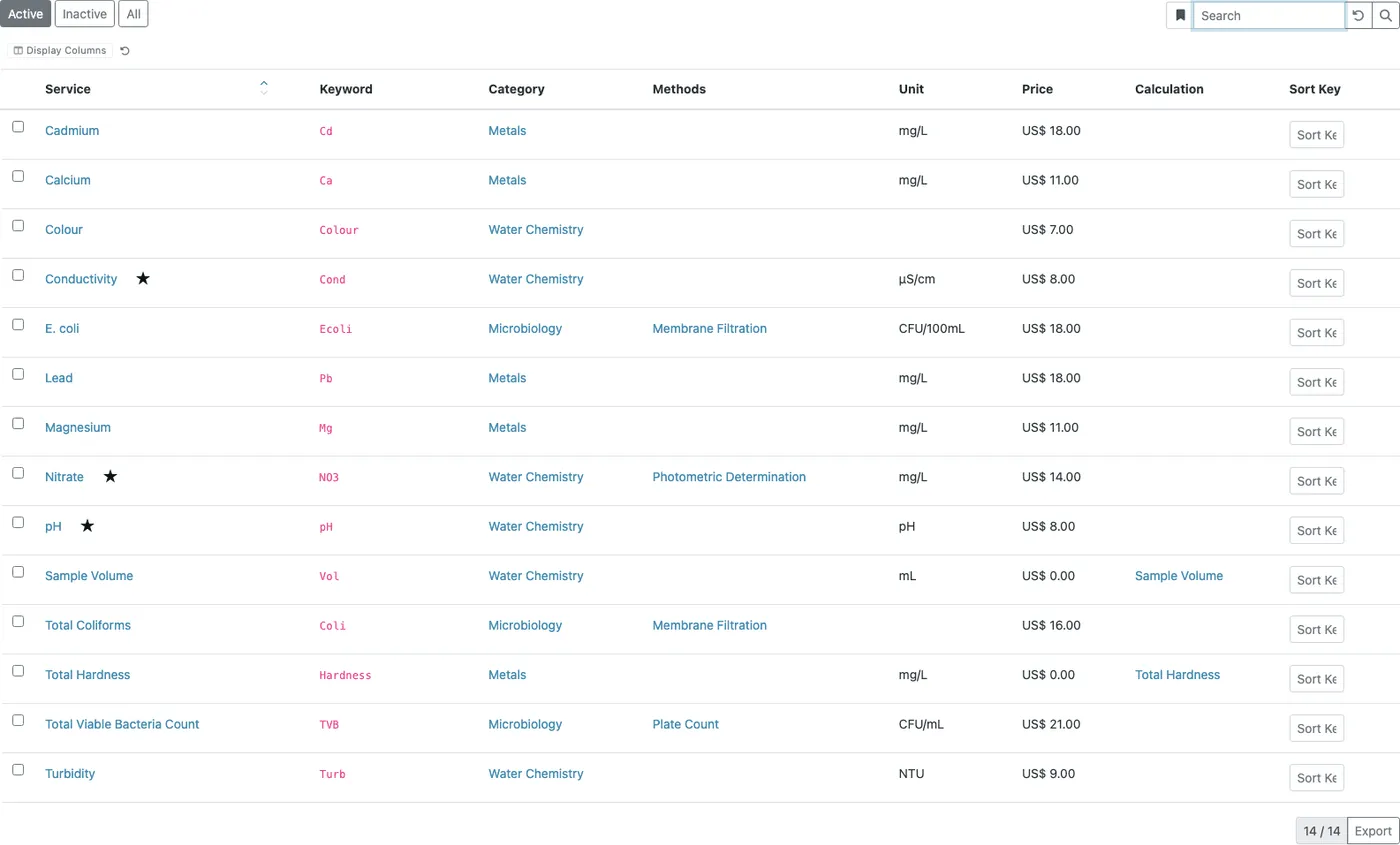
An Analysis Service is the definition of one test the lab offers: pH, Conductivity, Nitrate, E. coli. It describes how the result is captured, rounded, checked and reported.
The rule we give every lab: model services after what you report, not after what an instrument produces. If two instruments both measure Nitrate in mg/L, that is one service with two allowed methods and instruments, not two services. Two services for the same quantity means two sets of ranges, uncertainties and specifications to keep in step, and reports that show the same parameter under two names.
A template, copied onto every sample
When a sample is registered, SENAITE copies the service onto the sample as an analysis. The analysis keeps its own copy of the settings: precision, limits, uncertainties, result options, calculation. This is deliberate. A sample registered last year keeps the rules it was measured under.
The consequence surprises many labs: editing a service does not change analyses that already exist. If you correct an uncertainty, samples registered before the change keep the old one. To apply the new setting to an open sample, the analysis has to be removed and added again.
The four required fields
- Analysis Service Name: what the lab and the report call the test.
- Analysis Keyword: the short technical identifier.
- Point of Capture: whether the result is captured in the lab or in the field.
- Analysis Category: the group the service is listed under in forms, worksheets and reports.
The keyword needs the most thought. It is the ID of the analysis
inside each sample, the name a calculation formula uses
([NO3]), and the column an instrument import is mapped to.
SENAITE checks that it is unique and not already used in a
calculation formula. It does not stop you from renaming it
later, but a rename leaves behind every formula and import
mapping that still uses the old keyword. Pick a scheme before
go-live and keep it. Some labs prefix the method, for example
AES_Ca for calcium by AES.
Categories should follow how people look for tests: anions, metals, microbiology. Reports group results by category, so the category list is also the structure of your report.
The tabs that matter most
Analysis. Precision (decimals), the threshold for exponential notation, the maximum turnaround time that marks a sample as late, the maximum holding time after sampling, whether an attachment is required before verification, and the duplicate variation in percent used for duplicate checks on worksheets. Here you also set per service whether the submitter may verify their own result and how many verifications are required, if this test needs something other than the lab-wide default. Hidden keeps the analysis off the report by default.
Limits. Lower and upper detection limits and limits of
quantification, plus whether the analyst may select < or >
or enter a limit manually. This is what lets a result be
reported as < 0.5 instead of an invented number. Our post on
detection limits
covers the details.
Methods. The allowed methods, the default method, the instruments and the calculation. These choices are linked: an instrument is only offered if it is declared to run one of the allowed methods, and the calculations on offer come from the methods as well. Configure methods and instruments first, then the service.
Uncertainties. Uncertainty per result range, absolute or in
percent, printed next to the result as 6.67 ± 0.5. See
uncertainties.
Result Options. The result type (numeric, text, selection list and others) and predefined results for categorical tests. See result options.
On the first tab sit two fields labs tend to overlook. Accredited marks the result on the report, so a reader can tell accredited from non-accredited results when the report shows the accreditation. Price and VAT are used once pricing is switched on in the setup.
A worked example
Nitrate in a water lab, as we would set it up in a workshop:
| Field | Value |
|---|---|
| Name | Nitrate |
| Keyword | NO3 |
| Category | Anions |
| Unit | mg/L |
| Point of Capture | Lab |
| Precision | 1 |
| Method | Photometric determination |
| Instrument | the photometer that declares this method |
| Lower detection limit | 0.5 |
| Maximum turnaround time | 3 days |
| Uncertainty | 0 to 10: 0.3, above 10 to 100: 5% |
| Accredited | yes |
A result of 23.46 is shown rounded to one decimal, with an
uncertainty of five percent of the value, and marked as
accredited on the report. A reading below 0.5 can be reported
as < 0.5. The check against the drinking water limit comes
from a
specification,
not from the service.
Decide before you configure
- The keyword scheme. Write it down; it will appear in formulas, import mappings and API integrations.
- The category list. Fewer categories make forms and reports easier to read.
- Which tests deviate from the lab-wide verification rules. Set those per service, leave the rest at the default.
- Methods and instruments. They need to exist before the service can reference them.
Common mistakes
- One service per instrument instead of one per reported quantity.
- Expecting a service change to update samples already in the lab.
- Putting the unit or the method into the service name instead of the fields made for it.
- Renaming a keyword after calculations and instrument imports use it.
Once services are solid, the rest of the setup builds on them: analysis profiles bundle them, specifications judge their results, and calculations derive new results from them.