
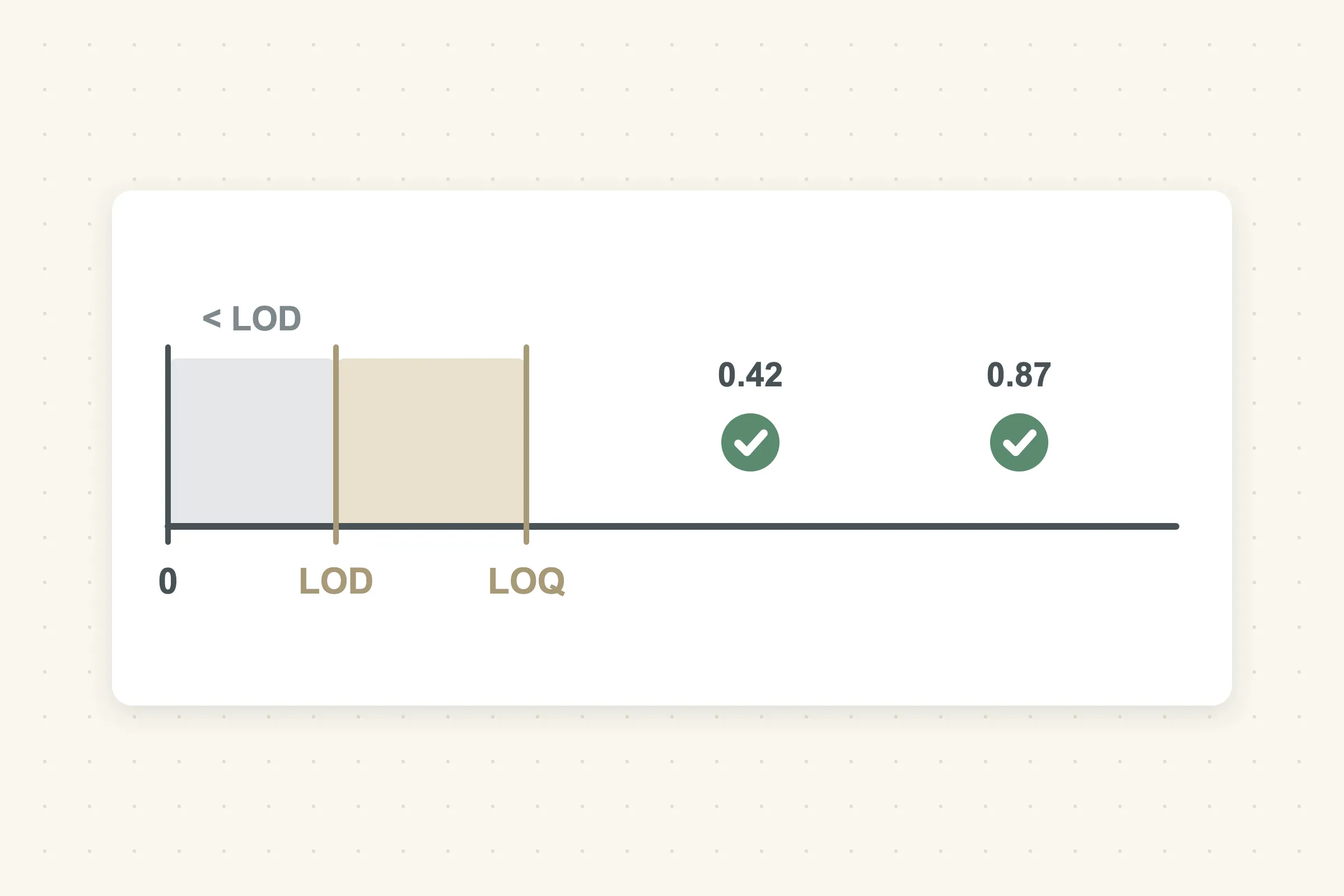
Every method has a range it can measure. Below the bottom of
that range the instrument still prints a number, but the number
does not mean what it says. A report that shows 0.04 µg/L
where the method cannot see below 0.1 invites the client to
compare it with a limit value and draw a conclusion the
measurement cannot support. SENAITE handles this with four
limits on the Analysis Service and a fixed set of display rules.
The four limits
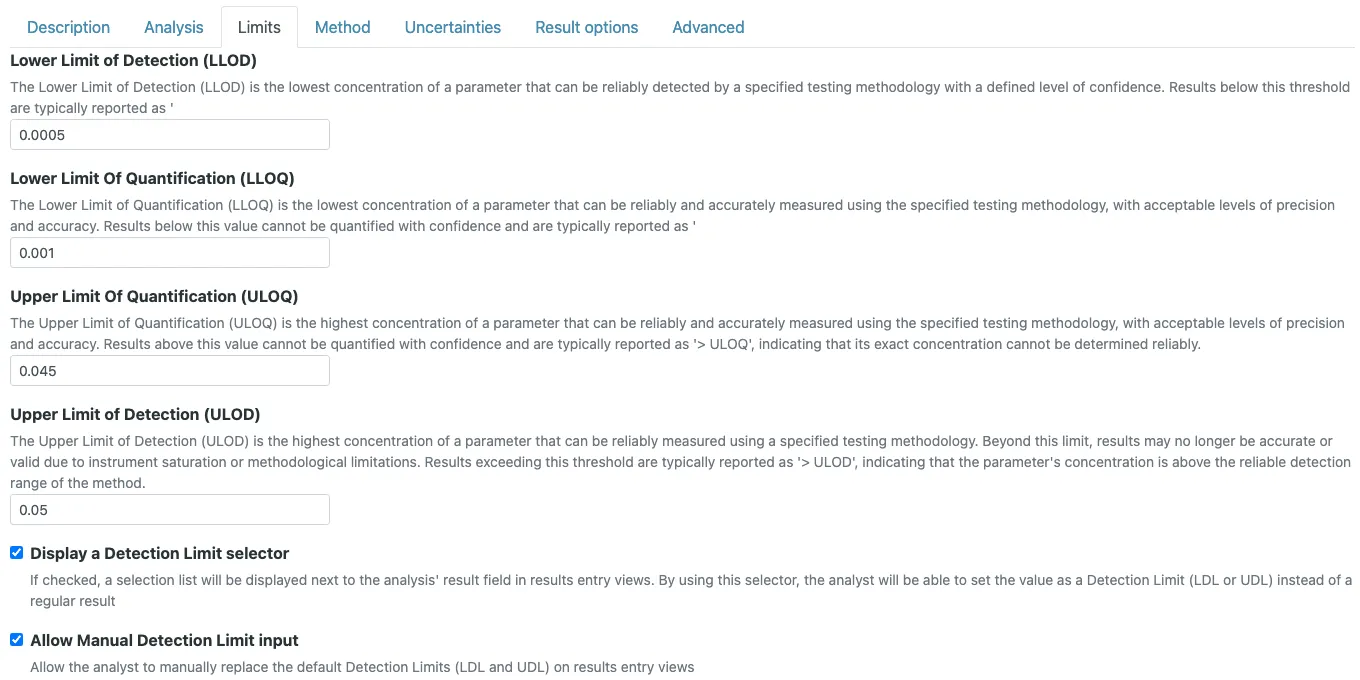
They sit on the Analysis Service, on the Limits tab:
Lower Limit of Detection (LLOD): the smallest amount the method can tell apart from nothing.Lower Limit Of Quantification (LLOQ): the smallest amount it can put a reliable number on.Upper Limit Of Quantification (ULOQ): the largest amount it can put a reliable number on.Upper Limit of Detection (ULOD): the ceiling of the method, for example where the detector saturates.
The order is enforced when you save the service:
LLOD <= LLOQ < ULOQ <= ULOD. The defaults are 0 for the two
lower limits and 1000000000 for the two upper ones, which in
practice means: no limits. Results entry and the calculation
wildcards call the two detection limits LDL and UDL; they
are the same two fields.
When you set the limits through the API or an import, send the quantification limits before the detection limits. Each value is validated against its neighbour as it is stored, and a detection limit that arrives first is compared with a quantification limit that is still at its default.
What the reader sees
Take a cadmium service in µg/L with LLOD 0.1, LLOQ 0.3,
ULOQ 50 and ULOD 100. The analyst enters a number; after
submission, SENAITE displays it like this:
| Entered | Displayed |
|---|---|
0.04 | Not detected |
0.2 | Detected but < 0.3 |
12.7 | 12.7 |
68 | > 50 |
Three details matter here.
The entered number is kept in all cases. Only the display changes, and only for submitted results; while the result is still editable, the field shows what was typed.
If LLOD and LLOQ are equal, the first row reads < 0.1 instead
of Not detected. A service that sets only one lower limit,
which is common, therefore shows the shorter wording.
Outside the quantifiable range no uncertainty is shown. The uncertainty post explains why.
The wording is fixed by SENAITE and translated with the interface. It is not a per-service text you can configure. If a client needs a different notation, that belongs in the report template.

Entering a result as a limit
Often the analyst does not have a number at all. The instrument
reports “below range”, or a diluted sample makes the method’s
usual limit meaningless. Two options on the Limits tab cover
this.
With Display a Detection Limit selector turned on, results
entry shows a small < / > selector next to the result field.
Choosing < sets the result to the service’s LLOD, and the field
becomes read-only. The result is displayed as < 0.1.
Allow Manual Detection Limit input goes one step further: the
analyst can state the limit that applied to this measurement.
Typing < 0.5 for a sample diluted fivefold stores 0.5 as the
limit for this analysis only, and the report shows < 0.5. The
limit the analyst names wins over the default on the service.
Choose per service:
- Neither option: the analyst always enters a number and the display rules above do the rest. Right for most methods.
- Selector only: the instrument reports “below range” without a value, and the method’s limit is fixed.
- Selector and manual input: the limit depends on dilution, sample volume or matrix and differs from sample to sample.
A trap for imports and integrations: if a value such as <0.5
arrives for a service where neither option is enabled, SENAITE
strips the < and stores 0.5 as an ordinary result. The
qualifier is lost without a message. Enable at least the
selector on every service whose instrument export can contain
< or > values.
Like all service settings, the limits and both options are copied into the analysis when the sample is registered. Changing them later does not affect samples that already exist.
Limits in calculations
When a result feeds a
calculation,
the formula receives the stored number. For a result entered as
< 0.5, that is 0.5. SENAITE does not mark the calculated
result as a limit by itself; it is shown according to the limits
of its own service.
If your method needs a convention, for example half the limit for non-detects, write it into the formula. Each dependency exposes its limits and flags as wildcards:
[Cd.LDL],[Cd.UDL],[Cd.LLOQ],[Cd.ULOQ]: the limits that apply to this analysis.[Cd.BELOWLDL],[Cd.ABOVEUDL],[Cd.BELOWLLOQ],[Cd.ABOVEULOQ]:1or0.
A formula such as
[Cd.LDL] / 2 if [Cd.BELOWLDL] else [Cd]uses half the detection limit for a non-detect and the measured value otherwise. Which convention is right is a question for your method validation, not for the software. Document it next to the calculation.
At go-live
- Fill in LLOD and LLOQ for every quantitative service from your validation data. A service left at the defaults shows every number, however small.
- Set ULOQ where the calibration ends, so results above it are
reported as
> ULOQinstead of an extrapolated figure. - Enable the selector, and where needed manual input, for every service whose results come from an instrument import.
- Check one sample per method in the report preview with values below LLOD, between LLOD and LLOQ, and above ULOQ before the first real report goes out.