
senaite.storage started as a map: facilities, positions,
containers. You put a sample in a slot; you knew where it lived.
The last few months turned that map into a lifecycle: how long
material stays, why it comes back out, and how you find its box
on a shelf when the scanner is the only tool you have.
Configurable retention
Every accredited lab has retention rules. Water samples keep for
one duration, blood for another, “Chikungunya positive” for
something else again. Until
#62,
senaite.storage did not know any of this. Retention lived in a
spreadsheet.
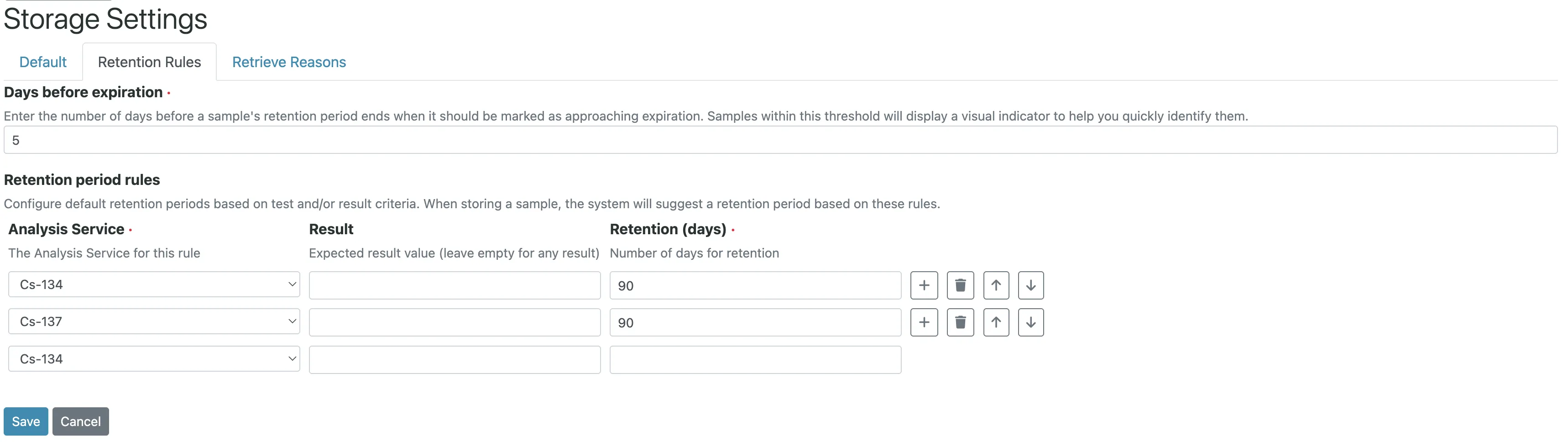
The new Retention Rules grid in the Storage control panel maps an Analysis Service, optionally a specific result value, to a retention period in days. The rule matching algorithm is explicit:
- Walk every analysis on the sample.
- For each analysis, look up rules by service UID.
- If a rule specifies a result value, match that too.
- Specific rules (with result) beat general rules.
- When several rules match, the longest retention wins.
This covers two real-world patterns cleanly. If the organism is the result of a test (an “Identified organism” service whose result is “E. coli”), you match on result value. If the organism is a dedicated test (a “Chikungunya” service whose result is Positive or Negative), you match on the same field. The store view auto-populates the retention days from the rule; a lab tech overrides it only when needed.
Companions land on top: #63 adds result-type-specific controls (different fields for numeric vs string results), #64 exposes Storage Expiry Date as a column, #65 adds a “Past Retention” filter, and #66 paints samples in red when they cross their expiry. The end result is a listing where the tech triaging the fridge on Monday morning can see, at a glance, what to move to disposal.
Recover became Retrieve
Small, but the kind of change that matters when auditors read
your SOPs.
#67
renames every user-facing occurrence of “recover” to “retrieve”,
to align with ISO 17025 and ISO 15189 wording. Internal
transition IDs (recover, recover_samples) and permission
strings are untouched, so add-ons that hook into the transition
keep working. Only labels, buttons, and messages moved.
A required reason on retrieval
Rejection has always asked why. Retrieval, until #70, did not. That is a hole in the audit trail: a sample went into storage and came back out, and nothing recorded whether it was for a re-run, a client dispute, or a second-opinion test.
The Storage control panel now carries a Retrieve Reasons grid. Lab managers configure the picklist (“Rerun”, “Client inquiry”, “External confirmation”) and a toggle makes selection mandatory. Trigger Retrieve on a stored sample and you land on a form where you pick a reason, or type a custom one via “Other…”. An info viewlet on the sample carries the reason, actor, and date from that moment on.
Code128 stickers for storage locations
You cannot barcode-scan into a shelf if the shelf has no barcode.
#72 fills
that gap with a StorageLocation_50x30mm sticker template that
renders a Code128 barcode of the location’s getId() plus the
breadcrumb full title as human-readable text. A
GetStorageStickers adapter registers it for IStorageFacility,
IStoragePosition, IStorageContainer, and
IStorageSamplesContainer. The listings gain a Print stickers
action in every review state, reusing the existing
workflow_action?action=print_stickers redirect.
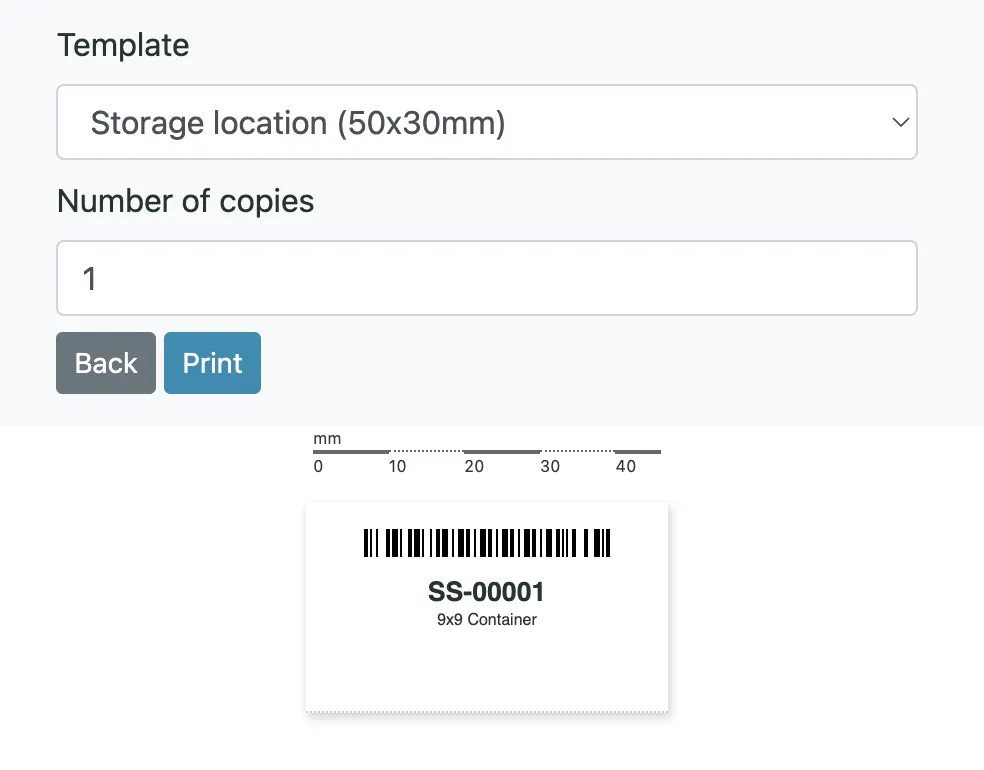
StorageLocation_50x30mm sticker rendered. Code128 barcode of the location id, breadcrumb title as human-readable text, previewed against a millimetre scale.Peel a sticker onto a shelf, and a scanner now reads back the
exact same string the sample-storage forms accept. The template
id is senaite.storage:StorageLocation_50x30mm.pt; override it
per instance the same way you override any other sticker.
A quieter change that mattered
#74 switched
the stored and past-retention sample listings to flat_listing.
No new features, just a faster render on containers with hundreds
of samples. Worth naming because it removes one of the last
“storage is slow” complaints.